A lab journal, a camera that finds the markers, and a command center
We opened a team channel for the project's photos and videos and started this lab journal. Then the camera learned to find three whiteboard markers on the desk, and we built a command center: a page on the PC that shows the live camera and a 3D twin of the arm and lets a person drive it with an on-screen joystick. Late in the day the command center learned click actions: click a marker and choose pick up, put down, move over or tap. They work in simulation; the real arm waits for the camera to be calibrated in its new spot.
Ravi drives the real arm from the command center: twist the wrist, lower, grab the black marker, lift, carry and put it down, while the 3D twin follows on the right.
Video: Ravi1:39No sound
What we did
- Ravi opened a team channel in Slack and posted the first 7 photos and 3 videos of the arm.
- Sorted all 10 files by the day they show: unboxing and first moves on Oct 24, the pen demo on Oct 25.
- Built
tools/journal.py: a folder per day with the original files, web-sized copies with location data removed, and a generated page; a journal home grouped by week. - Wrote the entries for Oct 17, 24 and 25 from our session logs, had each one fact-checked, and marked every day, photo and video as public or team-only.
- Blurred the phone screen in an Oct 17 photo and cropped its edges, so that day has a public picture.
- robotics.autosterea.com went live as a holding page. The site is built only from
journal/feed.json, which holds just the public parts. - Set a routine: a journal entry and a short team update after every work session, and a week summary every Sunday.
- The camera now finds the red, blue and black markers on the desk by colour and shape, and works out which way each one points.
- Taught the camera where the desk is: the arm put a marker down at 5 known spots and the camera saw where it landed, which gives a map from picture pixels to centimetres on the desk. It placed and picked the marker back up at all 5 spots without a miss.
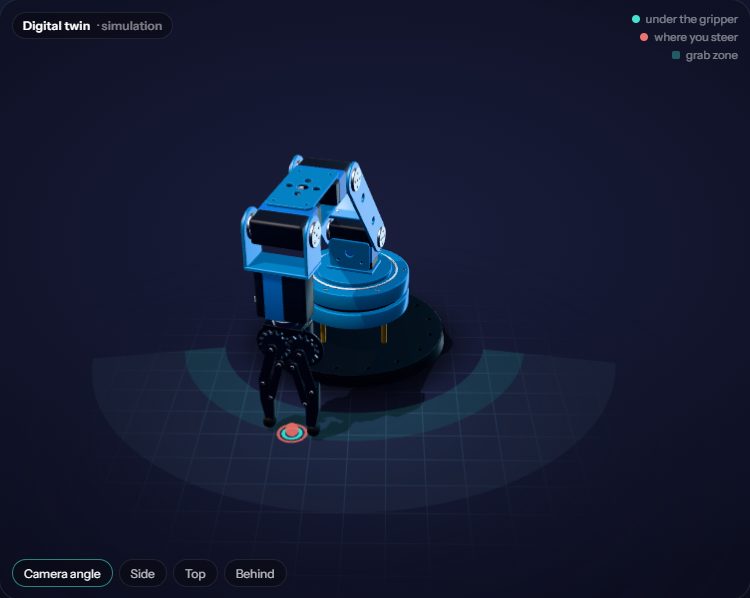
- Built the command center: live camera on the left, a 3D twin of the arm on the right, and a joystick, an up-down slider, Grab and Twist buttons, Ready, Rest and a big STOP underneath. Keys and gamepads work too.
- The 3D twin is the arm model from this website, posed several times a second from the angles the real servos report, so it shows the arm's true pose from any side.
- A Simulation switch drives only the twin, so anyone can practise without the real arm moving. A Record button saves camera frames and joint readings for teaching a model later.
- Ravi drove the real arm from the command center: he lined the jaws up with the black marker by twisting the wrist about 90 degrees, picked it up (the Holding light came on), carried it and put it down, on the first session with the new page.
- Ravi's verdict after driving: the directions and the controller feel good, the motors move a little jerkily.
- Smoother driving: the gripper's speed now ramps up and down instead of jumping, and steps go to the arm about 12 times a second instead of 7.
- Click actions: click a marker or a spot on the desk, in the 3D view or on the camera picture, and a small menu offers Pick up, Put it down here, Move over it and Tap it. Number keys choose, Esc stops.
- The simulation now has markers of its own: jaws that close across one hold it, opening the jaws puts it down. In a test the arm picked up the red one, turning the wrist to line the jaws up, and put it down within 1 mm of the clicked spot.
- A Calibrate camera button: the arm puts the marker it holds down at 12 spots, steps back so the camera can find it, and fits the picture-to-desk map. About 2 minutes, and it is redone whenever the camera moves.
What we learned
- Lab notebook
- Engineers write down each day's setup, numbers, failures and fixes so anyone can repeat a result or see why something changed. This journal is our lab notebook.
- Photo and video metadata
- Photos and videos carry hidden data such as the time taken, the phone model and often the GPS location. Files shared through Slack had lost their dates, so we dated them by what they show; the web copies are saved with no metadata at all, so no location reaches the website.
- Camera-to-desk mapping (homography)
- A flat desk seen by a camera can be mapped from picture pixels to centimetres with one 3x3 matrix, a homography. Four or more points known in both are enough to fit it. Our first points sat close together on one side, and the map was off by several centimetres on the far side: the points need to spread over the whole working area.
- Teleoperation
- A person steers and the robot does the joint maths. The joystick sends speeds such as 'left 4 cm a second, down 2'; the control loop moves a target point by that much several times a second and works out the joint angles for each new point with inverse kinematics, so nobody has to think in joint angles.
- Deadman switch
- Each drive command only lasts 0.4 seconds. If the page stops sending, because the tab closed or the Wi-Fi dropped, the arm simply stops where it is.
- Digital twin
- A 3D copy of the robot that follows the real one's measured joint angles. Ours knows where every link is, but not physics: objects on the desk are not in it yet.
- Learning from demonstrations
- If a person drives the arm through a task many times while the camera and joints are recorded, a small neural network can learn to map what it sees to the next move (imitation learning). The Record button collects exactly that kind of data.
- Lining up the jaws
- A two-finger gripper can only close across an object. A marker lying sideways needs the wrist turned about 90 degrees first, so the jaws close across its width rather than its length. The twist buttons do exactly that.
- Acceleration limit
- Jumping straight from still to full speed jerks the motors and shakes the arm. Capping how fast the speed may change (ours: 30 cm per second, per second) makes every start and stop a short ramp, which looks and feels smoother.
- Skills from small steps
- 'Pick up' is a short script of simple moves: go above the marker, turn the wrist to line the jaws up, lower, close, check the gripper really stopped on something, lift. Each step is checked before the next, and STOP can end it at any point.
- Telling unknowns apart in calibration
- The arm knows where it held a marker, not where the marker's visible middle is. If every marker is put down pointing the same way relative to the arm, that offset and the camera map blur together and the map ends up about 1 cm off. Putting every other marker down with the wrist turned 60 degrees separates them, and also shows which way the wrist turns.
Numbers
| Files from Slack | 7 photos, 3 videos |
|---|---|
| Web copies | photos 1600 px, videos 1280 px H.264 |
| Marker place-and-pick tests | 5 of 5 |
| Control loop with the real arm | about 7 updates a second |
| Where the gripper can point straight down at the desk | 12-16 cm from the base |
| First drive with the command center | 1 marker picked up, carried and put down |
| Click actions | 4: pick up, put down, move over, tap |
| Put-down accuracy in simulation | within 1 mm of the clicked spot |
| Steps sent to the arm while driving | about 12 a second (was 7) |
| Calibration spots | 12, about 2 minutes |
Problems and fixes
The Slack connector reads files only up to 10 MB, and the pen-demo video is 12.7 MB.
Fix: Downloaded it through Chrome from Slack's file link instead.
Photos and videos shared through Slack carry no date.
Fix: Dated them by what they show and by the phone's file numbering;
--daysets the date when adding files.The pixel-to-desk map was accurate where we measured and several centimetres off elsewhere.
Fix: Next calibration spreads the points across the whole area the arm can reach.
Reading the arm's position over USB takes about 0.14 s, which limits how often it can be steered.
Fix: Each step is asked to take a little longer than one loop, so the joints keep moving smoothly between updates.
A map fitted from markers that all pointed straight out from the arm was about 1 cm off in a test with made-up data.
Fix: Every other calibration marker is put down with the wrist turned 60 degrees; the same test then came out within 1 mm.
The camera was moved, so the morning's pixel-to-desk map no longer fits.
Fix: The one-click Calibrate camera makes a new map wherever the camera ends up.
Next
- Every work session ends with a journal entry; every Sunday adds a week summary.
- Move the arm and camera to a better, fixed spot, then run Calibrate camera.
- Try click-to-pick on the real arm, and check whether driving now feels smoother.
- Record a set of pick-ups for a first learning experiment.
Photos and videos
 Open the photo large
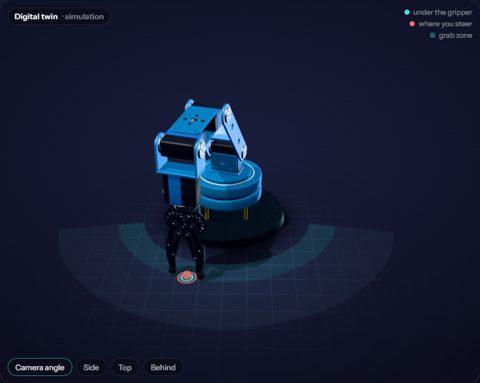
The command center's 3D twin: the arm reaching down to the desk, the coral dot where the joystick steers, and the shaded ring where the gripper can point straight down.
Photo: Screenshot