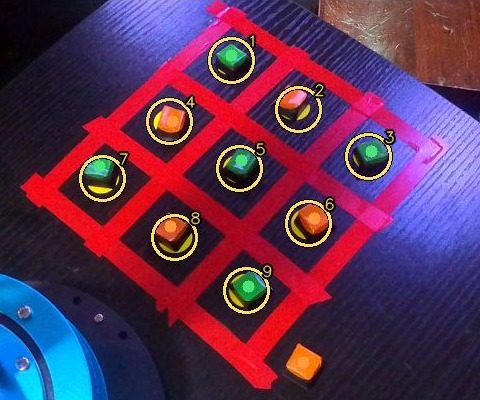
A tic-tac-toe board, a taught camera map, and the first cubes moved on their own
The arm moved to a new spot under the small GO 3S camera, with a taped 3 x 3 board, a yellow dot in each cell and small green and orange cubes. After a long run of missed grabs, Ravi taught the camera where the arm is by touching each dot with the fingertips. From then on the arm cleared the row nearest to it on its own, 6 cubes out of 6. The two rows further out still fail: stretched out, the arm bends more than its motors report. Next is a small camera on the gripper itself.
The arm clears the row nearest to it on its own: each cube off its cell and onto a spot beside the board, greens to its left, oranges to its right. Rings, numbers and crosses are the live page drawing what the arm sees and aims at.
Video: Claude (GO 3S desk camera, live page recording)1:15No sound
What we did
- New setup: the arm in a new spot, a 3 x 3 board of red tape with a yellow dot in every cell, five green and five orange cubes, and the GO 3S camera looking down from above and behind the arm.
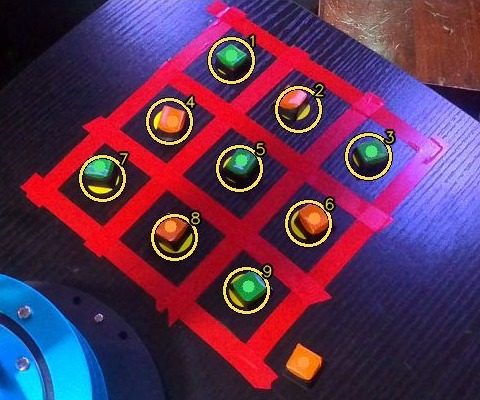
- A live page, Arm Live, shows the camera with everything the arm is doing drawn on it: the numbered cells, the cubes it sees, where it is aiming and the current step, plus a log. A Record button saves the view as a video.
- The camera finds the nine dots even when one is washed out by the lamp or two are hidden under cubes, and reads which cube sits on which cell.
- Ravi drove the arm with the joystick to show how he grabs a cube: right down to the desk, gripper tilted. The automatic grab now copies his height and tilt.
- Teach board: Ravi put the open fingertips on each of the nine dots and pressed Save. Nine exact pairs of 'where the camera sees it' and 'where the arm is' made a map good to about 2.6 mm.
- With cubes sitting on the cells, the camera learned how a cube's top looks compared with where the cube really stands: tops appeared 7 mm off on the desk map, after this within 2 mm.
- Clearing the board on its own: 6 of 6 cubes picked off the row nearest the arm and set beside the board, over two runs. The middle and far rows: none.
- Tried the kit's infrared obstacle sensor: backed up the arm controller's program, loaded a small program of our own that reads the sensor sockets, then put the factory program back when the sensor was set aside for now.
What we learned
- Teaching by demonstration
- Factory robots are usually taught positions by a person driving them there and pressing save. Our nine touches did the same for the camera: each one tied a spot in the picture to the arm's exact position, read from its motors.
- Parallax
- The camera sees the top of a 1.3 cm cube, and from a slanted view a raised point appears shifted. A map made from dots flat on the desk put cube tops 7 mm off; a second map for cube tops, learned from cubes on known cells, fixed it.
- Closed-loop correction
- A motor carrying a load stops short of where it is sent. Reading each motor back and asking again for what it still lacks gets every joint within a fraction of a degree; correcting the fingertip's position in centimetres instead overshot by up to 1.4 cm.
- Accuracy at full stretch
- Close to its base the arm points its gripper straight down and lands within a few millimetres. Stretched out to 17-23 cm its links and gears bend more than the motor readings show, so the fingertips land 0.5-1 cm off: enough to miss a 1.3 cm cube.
- Grip height
- A light cube gripped below its middle swings over in the jaws and is put down on its side; gripped too high, the jaws slide over it. Ravi's joystick grabs showed the height that works.
- Firmware backup
- Before replacing a microcontroller's program, read out its whole flash memory and check the copy against the chip, so the original can be written back byte for byte.
Numbers
| Camera map from the nine taught dots | 2.6 mm typical |
|---|---|
| Cube tops on the desk map | 7 mm off, then 2 mm |
| Cubes cleared from the row nearest the arm (12 cm out) | 6 of 6 |
| Cubes picked from the middle and far rows (17 and 23 cm) | 0 of 9 |
| Cube size, cell spacing | 1.3 cm, about 5.5 cm |
| Arm controller program backed up | 4 MB, checked byte for byte |
Problems and fixes
Grabs closed over the cubes, or caught them so low that they flipped over in the jaws.
Fix: Copied the height and tilt of Ravi's joystick grabs and squeezed harder.
A camera map built by reading the fingertips off the picture by eye was 3 cm off.
Fix: Ravi taught the nine dots with the joystick: 2.6 mm.
Moving the arm made the camera map useless.
Fix: Teach board takes about five minutes; redo it whenever the arm or the camera moves.
Cube tops looked 7 mm away from where the cubes stood.
Fix: A second map for cube tops, learned from cubes on known cells.
Correcting the fingertip's position overshot by up to 1.4 cm far out.
Fix: Correct each motor until its reading matches, learned above the cube and carried down to it.
The camera's picture lagged about half a second behind the arm.
Fix: The live page reads the camera all the time and keeps only the newest picture.
The middle and far rows still miss: the arm bends at full stretch, and the camera behind it cannot see the grab.
Fix: Not fixed yet: next comes a small camera on the gripper, and a smaller board closer to the arm.
Next
- Get a small USB camera for the gripper (close focus, 2-3 m cable) and put the EMEET back as the fixed camera over the board.
- With the gripper camera, centre each cube between the jaws before closing, then retry the middle and far rows.
- A smaller board, about 3 cm cells, closer to the arm, so every cell sits where grabs already work.
- Then the game: the camera reads the board, a tic-tac-toe program on the PC picks the move, the arm places a green cube.
Photos and videos
 Open the photo large
What the camera reads: the nine numbered cells (1-3 the far row, 7-9 the row nearest the arm) and the cube on each.
Photo: Claude (GO 3S desk camera, live page recording)